

Over the last few days I have been vibe coding the game Glitchjack, a black jack inspired game with all sorts of glitches. Right now it is pretty basic with only generating a random deck on each game but it has a full back end and front end. The game isn’t impressive at all, but I used it as a proof of concept to see how far I could get with vibe coding. I decided to try out Claude Code. At first I really wanted something in my editor but decided to give this a go after hearing a lot about it.
What’s vibe coding? It’s using AI to generate code or full entire applications. An Agent is an AI bot that will be working along side you completing tasks.
I started out by building the back end in golang which I had previous experience in and could mostly tell it what I wanted to do, checking the code and changes along the way. Then I wanted to create a new React app which I had little to no experience in.
General Observations
- Usage and credits are a big problem. I was using the free version and in an hour had to upgrade to pro ($17/mo), a few hours later I ran out of credits again and had to upgrade to Max($100/mo). The next day I exhausted my Max credits by 3pm. This is certainly not cheap. I don’t think I would have been even close to being able to finish my app in a few days without the Max version.
- Understanding usage is quite difficult. At one point you get a message that your model is changing to Sonnet, really not clear what the difference is for my tasks or why this is a thing at all. When you get close to running out you also get a message, but there is no indication about how close you are, and if you run a longer task there doesn’t appear to be any easy way to resume it and work can be lost. There’s no token usage graph that I could find.
- Compacting and clearing history seem to be important. Claude will store a lot in memory which is good, but if you drastically change what you are doing dropping that context and starting over seems to significantly reduce token usage, as well as being very specific. Overall just generating less work means less tokens but it can be hard to understand how many tokens something is going to cost.
- Vibe coding isn’t just the agent spitting out code, the level of debugging the agent can do is impressive.
- The agent is actually pretty smart but often makes dumb decisions. You need to be continually checking to make sure it isn’t and adding rules via # memory commands or in the CLAUDE.md is absolutely crucial.
- The agent can go too far. I can mention to check with me or not make changes until I verify something and it can often skip or go around it. I talked to it about rebuilding the front end step by step, then it suddenly decided to build what it thought was a beautiful complete front end. It was terrible. I had to walk it back step by step. Too much agent freedom isn’t good.
- After a while a lot of “junk” can be built up, old debugging classes the agent decided it needed when we ran into problems, or a lot of over complicated code paths as the requirements changed. I found taking the time to refactor at major milestones was wildly helpful.
- Make sure to do tests from the beginning. This is the primary mechanism for the agent itself to know if the changes it is making are going to work. I have the agent run its own tests after making changes and add tests automatically when it adds new code.
- Have your agent add code comments everywhere! This will make it significantly easier to understand the code that is generated while you look through it.
- I tried sub agents, but they didn’t really seem to work very well, perhaps I had them misconfigured.
- Graphical and UI issues seem much more difficult for the agent to debug itself. Things can be obviously wrong or missing but since it cannot “see” the result it can be problematic. More about how I worked around this in the front end section.
- Just pasting an error message into the prompt seemed to resolve most issues, when there were no errors or messages to post it became a problem, which is when i realized how important having these was for the agent.
- The agent can make very human junior mistakes. Sometimes if tests were failing it would just remove them or say – well we improved and maybe we can fix them later. On multiple occasions when something wasn’t working it would just downgrade the version of it and get it to work. Then I would have it re-upgrade again. I could see how this could be easy to miss as well.
Lessons on the backend
Repository: https://github.com/pshima/cardgame-api
- I went piece by piece, adding small feature by small feature, this seemed to work very well. Items like – add this api route, now create an API that does this, etc.
- Initially it kept a lot of code in 2 files, each around 2-3k lines of code. When asking it to refactor everything, it easily split out everything in to multiple files and the testing kept everything sane.
- This was a blackjack game, it understood the rules of blackjack pretty easily because of that, and was able to figure out things like phases of the game and rules of the game and had the ability to not only code them, but provide the right inputs and parameters so when I built the front end there were no changes needed to the apis.
- I generated an open api spec and continually had the front end reference this, this seemed to work very well and when it didn’t I had it look at the code or the README files.
- I needed images for all the cards, and asked it to generate them. I don’t think claude code really does images, so it created its own golang app that would generate them. This was impressive. It had many issues but I was able to have it continually adjust.
- As one example of “dumb” results, it went to generate all the card images but just left out a few Queen cards and all the King cards. Prompting it to fix it, it was able to but obvious things being wrong seems common. It then at least wrote a test to ensure all of them were there.
- Its command line abilities are impressive, it can spin up the server then read the logs, then fix the issues and do it all over again including with tests and is full end to end testing. Adding the right logging was critical for the agent to understand what went wrong when it did.
- Asking it to make the app production ready went reasonably well, the same for security improvements and observability. It was able to easily implement OTEL metrics exporting to prometheus but I never actually checked that.
- Dockerizing and infrastructure tasks as well as kubernetes tasks it seemed to handle with ease. There were many issues particularly with the docker but it was able to resolve all of them.
Lessons on the front end
Repository: https://github.com/pshima/blackjack-frontend
- This was much harder for me as I have little react experience but I felt like this would help me learn. It was much harder for me to review things, or understand what was or wasn’t “good” and I let the agent make a lot of decisions. My app ended up being quite a mess.
- UI elements were very difficult to get correct, even with very specific instruction. “Add a button here that is 5px away from <object> and make it centered like <text>” and things like this half the time ended up in disaster. I likely wasn’t able to give it the direction it actually needed.
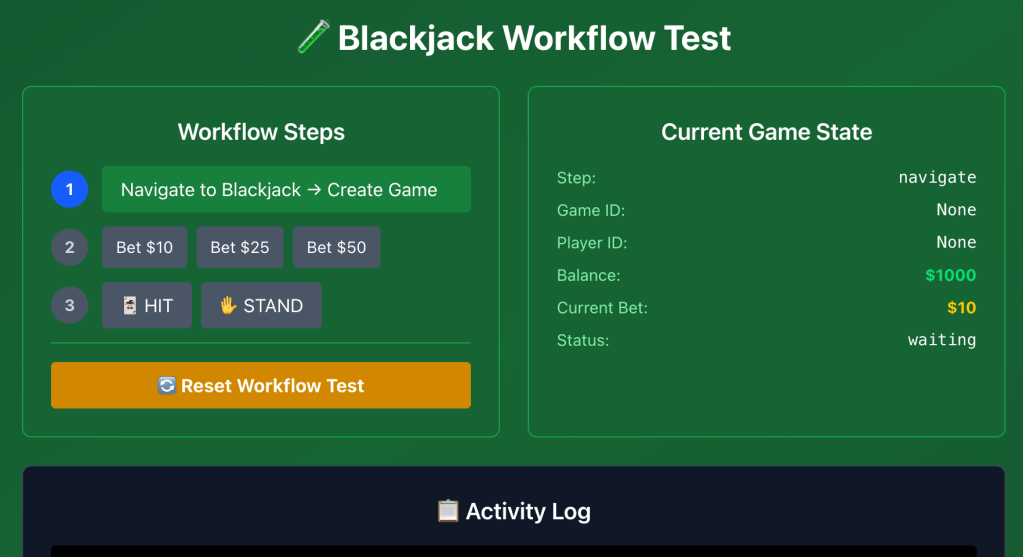
- With so many things going wrong on developing it and the agent having too much freedom before I got anything real working we had built a full debugging suite. This was actually truly impressive and I think on my next app I will start out with building the debugging from the beginning.
- I eventually got into a flow with the agent where it would make some changes and then ask me what it looked like or what was displaying. I would respond and 80% of the time it would understand and figure things out.
- It really struggled with getting tailwind going or utilizing it effectively, however you can see some of the results on the admin dashboard.
- Building the debugging elements with full game flows in them really messed up the code base. Multiple files/components doing similar things but one for the admin only section. Eventually I had it find and remove all admin functionality and the code base was much cleaner, but I miss some of the admin tools.
- On design elements the agent would often go to far. When trying to set a pixelated NES style theme, it then tried to change the buttons of the game to look like an NES controller. Half the time I would catch them but later it would try and sneak more changes like this in. Having said that, the admin page it eventually came up with was fine after I got it to fix tailwind.
Example Admin Dashboard

 Pete Shima
2 responses to “Exploring Vibe Coding: Building Glitchjack”
[…] https://peteshima.com/2025/07/31/exploring-vibe-coding-building-glitchjack/ […]
LikeLike
[…] time, I thought I would use this as an experiment on if I could make a game with him in the future. GlitchJack took me a lot of time waiting around and without a lot of progress for long periods of time. I need […]
LikeLike